

As the year wraps up, here’s one less reason to leave your workflow.
October brings Redox developer docs into your AI tool of choice, so answers come from the source and you never lose your place. It builds on the AI foundation introduced earlier this year.
Read on to see how to start, scale, and build with AI, with Redox as your interop partner every step of the way.
November 2026 Release
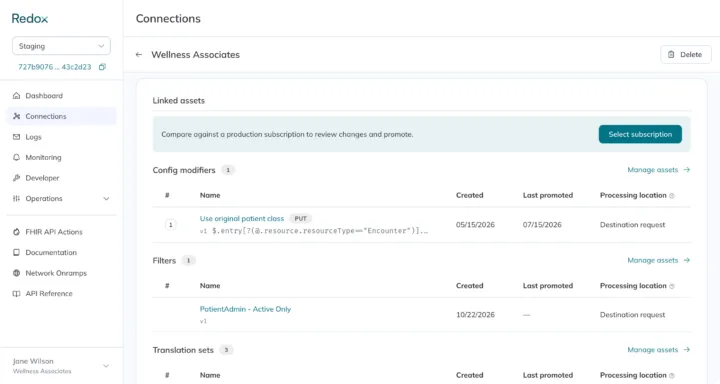
View, compare, promote, and copy assets across environments
Promotions is often the slowest part of an implementation. This month, it gets a lot faster.
These updates, available across the dashboard, Platform API, and MCP, make it easier to move translation sets, filters, and config modifiers between environments:
View all subscription-linked assets
Start with the full picture. See every asset linked to a subscription in one place before you compare or promote, so nothing gets left behind.
Compare staging and production
See assets side by side in the diff view, so it’s clear what’s ready to move and what still needs work. All bulk actions start here.
Promote in bulk or one at a time
To promote in bulk, from the diff view: Select multiple assets and promote them from staging to production in one step.
To promote one at a time, from the individual asset: Promote any single asset directly from its own view. For a first-time promotion, you’ll link the asset to a production subscription as part of the same flow. Staging fields carry forward to that subscription wherever possible, and in-product guidance covers each step.
Copy within or across environments
Duplicate assets within the same environment or into any other.
To copy in bulk: Select assets in the diff view.
To copy one at a time: Start from the individual asset. Copies are unlinked and independent, so edits never touch the original.
Access control that scales with your team
More teammates, more environments, more AI agents. Managing access should be simple and secure as you grow, regardless of the number of users.
Service accounts: Create a machine user configured to perform tasks within a Redox organization. Use these for cron jobs, scripts, and other automation tools, even an AI Agent. Each now has its own auditable identity, with roles and scopes limited to its task. No more borrowing a human’s login.
Role assignment at invite and via SSO: Map identity provider groups to Redox groups so access is set at sign-in, or assign roles when inviting users.
User groups: Assign org- and environment-level roles to a group once. Members inherit them automatically.
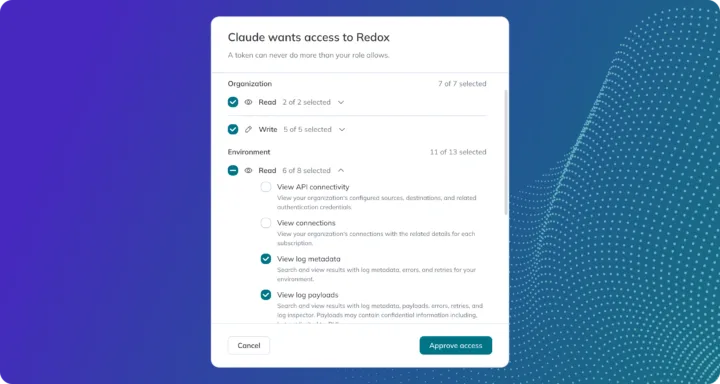
Granular MCP scopes
Choose exactly what an AI tool can read or change before approving access. Learn more
Smarter skip periods for alert rules
If an alert fires during a skip period (like a weekend or holiday) and the problem is still happening when it ends, you’ll get an email. No settings changes needed. Learn more
October 2026 Release
Search Redox developer docs without leaving your AI tool
Got a Redox question mid-build? Just ask your AI.
The new redox-docs-search tool on the Redox MCP server lets Claude, Gemini, or whatever AI tool you swear by search the Redox developer docs for you. No tab-switching, no losing your train of thought.
And the answers actually come from the docs, not from your AI’s best guess based on its training data. Every answer links to the source page, so you can check it in one click and get back to building.
Available now for customers who have enabled MCP server access. Connect to the Redox MCP server to get started.
More is on the way this fall. Check back here for updates from the November and December releases.
In the meantime, catch up on what shipped July through September. A few highlights:
- Redox MCP is in the Anthropic Connector Marketplace. Find it right alongside the other tools in Claude.
- Config modifiers got an upgrade. Create and test them without needing live traffic.
- Dark Mode is here (your eyes will thank you), along with a refreshed sidebar navigation.